SQL: Back to basics

Posted on Thursday, June 10, 2010 by Nicki

Today's lesson might be common knowledge for you, but for me it was a good back to basics again. It concerns the calling of scalar functions from the WHERE clause of a SELECT statement.

One could expect the following statement to execute the function only once, but, then, you'd be wrong.

select * from sys.objects
where dbo.myfunc(1) > 1


SQL server executes the function once for every row in sys.objects, even though it is called with a constant parameter and will never return a different result. Typically this is something you would not pick up in development with a small dataset, but performance will decrease dramatically as the dataset size increases.

So, the right way to write the above SQL statement would be something like


declare @num int
set @num=dbo.myfunc(1)
select * from sys.objects
where @num > 1

Be aware, be very aware!

Rounding those corners

Posted on Thursday, May 20, 2010 by Nicki

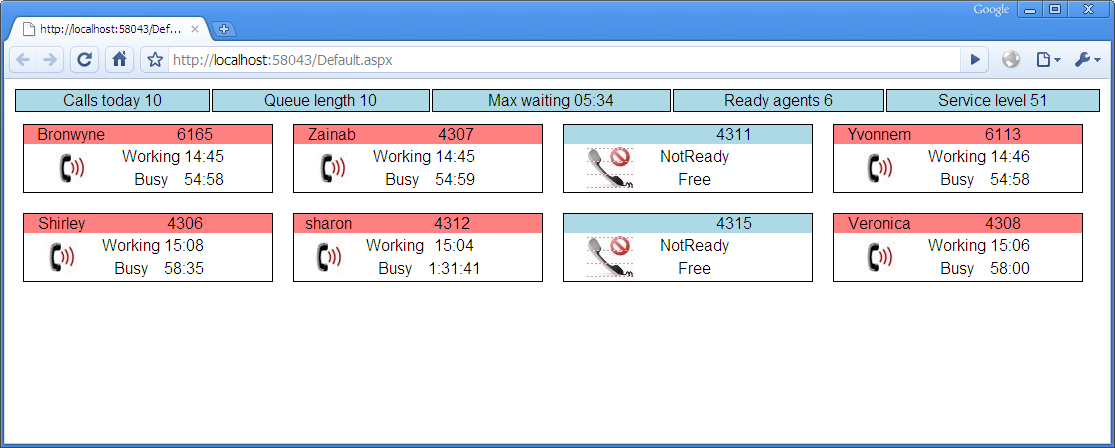
A client recently requested a web-based wallboard/dashboard for their one callcentre, and I wanted to give it a nice smooth look, this is where rounded corners come into play.

I had a look at various solutions available, some using images and some scripting. In the end I settled on a non-image Javascript solution called Nifty Corners.

It really is easy to add to your existing design.

<script type="text/javascript" src="niftycube.js"></script>
<script type="text/javascript">
window.onload=function(){
Nifty("div#box","big");
}
</script>


I had some issues with alignment and sizing due to the CSS layout with floating divs used, but those issues have nothing to do with Nifty Corners itself.

Here is a part of a screenshot of the final product. I think most people will agree it looks better than the normal sharp corners if you don't apply styling.


Nifty Corners Cube are released under the GNU GPL licence, so you can use it freely in your sites.

Browser resizing extension for Chrome

Posted on Thursday, April 22, 2010 by Nicki

I found a nice extension for Chrome to resize the browser window to test your web app in different resolutions, and thought I'll share it.

https://chrome.google.com/extensions/detail/idhfcdbheobinplaamokffboaccidbal

Floating div solved

Posted on by Nicki

In a previous post I had some issues with floating divs. I asked a CSS guru, and all that I had to do was set the height attribute on the floating divs to get it behaving as expected.

Thanks darkelf!

Have I gone mad?

Posted on Wednesday, April 21, 2010 by Nicki

I'm busy putting together a web-based wallboard for a callcentre, and suddenly my prototype started going crazy. I'm doing all the layout with CSS, and it worked very well, until suddenly, it went crazy.

Before:


After:


As you can see, the floating divs are going horribly wrong. What did I change? The only change was to add a font-family attribute to the body class in the stylesheet, like this:


body
{
font-family: Verdana, Arial;
}


Can any CSS or HTML guru explain to me why this happens? If I take away Verdana and leave Arial, it works in Chrome, I have to remove the whole font-family line for it to work in IE7.

Awaiting your comments...

Create new event log source

Posted on Thursday, March 18, 2010 by Nicki

Normally ASP.Net does not have the required privileges to create an event log source, so you have to create one manually, or execute the creation code with the required privileges.

To sort out this little problem, there is a command line utility included in Windows called eventcreate. I've NEVER heard of this before, but apparently it has existed for a long time. It actually creates an event, but will create the specified event log source if called with the correct priviliges, like the Administrator account.


eventcreate /SO "MyApp" /D "MyMessage" /L Application /T ERROR /ID 999

SUCCESS: A 'ERROR' type event is created in the 'MyApp' log/source.

Filtering Out of Office notifications from rt (Request Tracker)

Posted on Thursday, December 17, 2009 by Nicki

It's that time of the year again, where everyone has Out of Office replies set. One of our systems send out daily reports of files processed, and the Reply To address is set to the rt Queue address. This causes unnecessary requests being opened in rt for the Out of Office replies. What can one do?

Well, that's what I love about open source, procmail is your friend.

I found some references where people had exactly the same problem, so here is the solution I used based on those references.

Create/modify the procmailrc file (in my case it sits in /usr/local/etc/procmailrc).


QUEUE="$1"
ACTION="$2"

# Trash Outlook autoreplies
:0 w
* ^subject:.*Out of Office AutoReply
/dev/null

# Pass to rt
:0 w
|/usr/local/bin/rt-mailgate --queue $QUEUE --action $ACTION --url http://xx.yyy.zz/rt


The $1 and $2 variables are arguments passed to procmail, see the arguments after the -a command line switch below. These are stored in $QUEUE and $ACTION and passed to rt-mailgate in turn to make the solution more generic and reuseable.

Then I modified the postfix aliases file to pass all mail for the queue to procmail:


raxas-request: "|/usr/local/bin/procmail -a Raxas -a correspond"


Then remember to execute newaliases and postfix reload, and send some test mails.

Source links:
http://lists.bestpractical.com/pipermail/rt-users/2005-June/031855.html
http://www.beedub.com/cgi-bin/wiki.cgi/27