I found a nice extension for Chrome to resize the browser window to test your web app in different resolutions, and thought I'll share it.
https://chrome.google.com/extensions/detail/idhfcdbheobinplaamokffboaccidbal
Browser resizing extension for Chrome
Floating div solved
In a previous post I had some issues with floating divs. I asked a CSS guru, and all that I had to do was set the height attribute on the floating divs to get it behaving as expected.
Thanks darkelf!
Have I gone mad?
I'm busy putting together a web-based wallboard for a callcentre, and suddenly my prototype started going crazy. I'm doing all the layout with CSS, and it worked very well, until suddenly, it went crazy.
Before: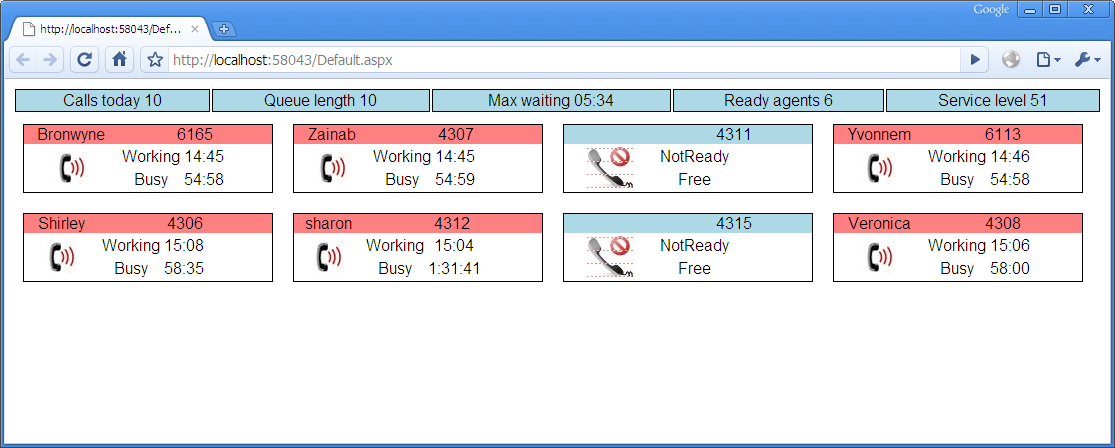
After:
As you can see, the floating divs are going horribly wrong. What did I change? The only change was to add a font-family attribute to the body class in the stylesheet, like this:
body
{
    font-family: Verdana, Arial;
}
Can any CSS or HTML guru explain to me why this happens? If I take away Verdana and leave Arial, it works in Chrome, I have to remove the whole font-family line for it to work in IE7.
Awaiting your comments...
Create new event log source
Normally ASP.Net does not have the required privileges to create an event log source, so you have to create one manually, or execute the creation code with the required privileges.
To sort out this little problem, there is a command line utility included in Windows called eventcreate. I've NEVER heard of this before, but apparently it has existed for a long time. It actually creates an event, but will create the specified event log source if called with the correct priviliges, like the Administrator account.
eventcreate /SO "MyApp" /D "MyMessage" /L Application /T ERROR /ID 999

SUCCESS: A 'ERROR' type event is created in the 'MyApp' log/source.
Filtering Out of Office notifications from rt (Request Tracker)
It's that time of the year again, where everyone has Out of Office replies set. One of our systems send out daily reports of files processed, and the Reply To address is set to the rt Queue address. This causes unnecessary requests being opened in rt for the Out of Office replies. What can one do?
Well, that's what I love about open source, procmail is your friend.
I found some references where people had exactly the same problem, so here is the solution I used based on those references.
Create/modify the procmailrc file (in my case it sits in /usr/local/etc/procmailrc).
QUEUE="$1"
ACTION="$2"

# Trash Outlook autoreplies
 :0 w
 * ^subject:.*Out of Office AutoReply
 /dev/null

 # Pass to rt
 :0 w
 |/usr/local/bin/rt-mailgate --queue $QUEUE --action $ACTION --url http://xx.yyy.zz/rt
The $1 and $2 variables are arguments passed to procmail, see the arguments after the -a command line switch below. These are stored in $QUEUE and $ACTION and passed to rt-mailgate in turn to make the solution more generic and reuseable.
Then I modified the postfix aliases file to pass all mail for the queue to procmail:
raxas-request: "|/usr/local/bin/procmail -a Raxas -a correspond"
Then remember to execute newaliases and postfix reload, and send some test mails.
Source links:
http://lists.bestpractical.com/pipermail/rt-users/2005-June/031855.html
http://www.beedub.com/cgi-bin/wiki.cgi/27
Ubuntu and 1.44mb floppy drive
A neighbour recently had a computer crash, and needed to get some files off floppy disks for her school. Luckily my old Athlon700 serving as a mythbuntu PVR still had a floppy drive.
I inserted the disk, and tried to mount it. It said the device did not exist. Huh? Then it dawned on me that the driver was possibly not loaded. I did some googling, and found out that you have to do a sudo modprobe floppy to load the driver before trying to mount it.
After I did that I was able to get all the files off the 3 disks and burned them onto CD. It was quite a trip down memory lane, I can't remember how many years it has been since I last used a floppy drive. Just the sound of the thing copying the files was almost foreign. And the speed, wow. We have become so used to USB flash drives. This was portable data back in the days.
Sidestepping those AutoRun USB viruses
I've had far too many people recently that got one of the AutoRun variants such as Conficker on their computers. Here is a tip on how to disable AutoRun (normally that window that pops up when you plug in a USB drive, but abused by Conficker and others to launch the viral code).
Click on Start / Run, type gpedit.msc and press Enter,
Then double-click Administrative Templates under Computer Configuration. Click on the System folder. In the right-hand side pane you should see Turn off AutoPlay. Double-click it, click on Enabled and make sure that All Drives is selected. Click Ok and close the Group Policy application.
Now whenever you plug in an infected USB drive it won't try to infect your PC right away.
Credit: http://www.howtogeek.com/howto/windows/disable-autoplay-of-audio-cds-and-usb-drives/
Subscribe to:
Posts (Atom)